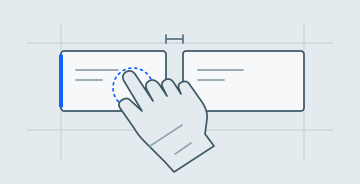
Gloved interaction
Gloves influenced the spacing and grouping of touch controls across the instrument, especially where frequent adjustments sit beside actions that stop work.
 PARSA BALALI
Product designer
PATHOLOGY DEVICE
I led the interaction design for a pathology scanner, from live specimen inspection and multi-rack scanning to hardware maintenance. All three workflows share one instrument and one 15.6-inch touchscreen.
Pathology Device
Touchscreen workflows
THE INSTRUMENT
In Live, the technician directly controls the field of view and focus for one slide. In Scan, they prepare work that the instrument will carry out across racks. In Maintenance, they inspect the motors, sensors and loading mechanisms that make both workflows possible.
I organized the software around these three responsibilities. Each workspace gives priority to a different kind of information: the live image, the batch being prepared, or the state of the hardware. Laboratory context and the physical rack-and-slide arrangement give technicians a common point of reference.
FIELDWORK
At the bench, a technician’s attention moves between the glass slide, the loading port and the display.
Observing technicians in pathology laboratories gave me three constraints to carry through the system. Controls had to work with gloved hands, important state had to be readable from different positions, and the screen had to keep the specimen identifiable as the technician moved between the instrument and its display.
Gloves influenced the spacing and grouping of touch controls across the instrument, especially where frequent adjustments sit beside actions that stop work.
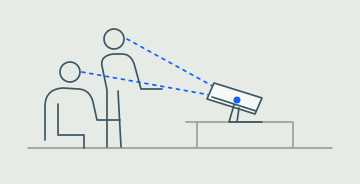
Working seated or standing changes the distance and angle of view. That shaped which information needed to be legible at a glance and which could wait for closer inspection.
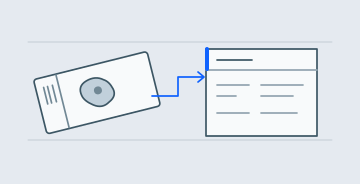
A slide changes from a physical object into a thumbnail and then a magnified image. Its rack and slot numbers give the technician a way to identify it in each view.
SCANNING WORKFLOWS
The physical hierarchy is the same in both workflows: the instrument holds racks, and each rack holds slides. What changes is who controls the next step.
In Live, the technician stays in a tight loop with the instrument. They locate the slide, inspect the image, move the field of view and adjust focus. I carried the specimen’s rack and slot into the inspection view so that this change of scale retains its physical context.
BATCH PREPARATION
A batch can include several racks, slides at different stages of preparation, and individual regions of interest. I separated selection, queue review and history so technicians can distinguish what they intend to scan, what is ready, and what has already run. The queue below brings the current rack into detail while retaining the scope of the full job.
INSTRUMENT MAINTENANCE
Maintenance required a different model from scanning. Technicians work by hardware subsystem: motors, system checks, optimization, and sensors and lights. Within each subsystem, the interface needs to connect a reported state to a part the technician can find on the instrument. The rack-sensor view illustrates that relationship by using the physical layout of the carousel and its loading port.
DESIGN PERSPECTIVE
The same rack has a different meaning in each workspace. In Live it leads to a specimen. In Scan it groups work for a batch. In Maintenance it is a physical position whose sensor can be checked. Keeping those relationships consistent gave each workflow room to be different without asking technicians to learn a second model of the machine.
At the bench, I would evaluate the handoffs: can a technician identify the specimen they are viewing, explain what the scanner will process next, and locate the corresponding hardware when it needs attention?
SELECTED WORK
Another context.
Another design challenge.